Gemini Omni Flash AI Video Generator

As the first model in Google’s Omni series, Gemini Omni Flash blends Gemini’s reasoning with creativity to generate high-quality videos adhering to real-world logic. By freely mixing text, images, music, and video inputs, it empowers users to seamlessly create realistic, premium multi-modal video content. Try Gemini Omni Flash in HIX AI video generator now!
What Makes Gemini Omni Flash Stand Out
- Edit through Natural Conversation: Seamlessly adjust and fine-tune video effects.
- Powerful Multimodal Input: Effortlessly generate videos from text, images, and video clips.
- Multi-Edit Consistency: Repeatedly modify the same video while flawlessly preserving its visual continuity.
- Knowledge-Driven Physical Realism: Crafts compelling stories powered by science and history, brought to life through motion that perfectly obeys real-world physics.
- Sketch-to-Video Realism: Transform static images or rough sketches into lifelike, dynamic videos.
- Image-Driven Character Swapping: Provide a reference image to flawlessly sync a new character with original motion and dialogue.
Edit through Natural Conversation
With Gemini Omni Flash, updating a video’s appearance, motion, or effects is as simple as having a conversation. You no longer need to learn complex editing software—if you can describe your vision, you can create the video.
| Prompt | Output video |
| When the person touches the mirror, make the mirror ripple beautifully like liquid, and the person’s arm turns into reflective mirror material. |
Powerful Multimodal Input
Gemini Omni Flash effortlessly combines text, images, and video footage to weave scattered elements into a compelling story. It captures every detail perfectly—whether synchronizing a harp sound effect with the touch of a fern leaf, or blending glowing fireflies from a photo into a video to create a beautifully cohesive masterpiece.
| Input |
 |
||
| Prompt | Add harp sounds synchronized to when I touch each fern leaf. Change the leaf structure to all resemble semi translucent 3d bioluminescent plant life, with bioluminescent fireflies flying around it that react as I play, in sync with the sounds, subtle bokeh depth of field dynamic lighting, relecting off the walls in the room, keeping the room structure the same | ||
| Output video | |||
Multi-Edit Consistency
Gemini Omni Flash keeps video details perfectly consistent even after multiple rounds of editing. This gives you total control over the production process, ensuring seamless creative continuity from your very first draft to the final cut.
| Input video | Prompt: Transport the violinist to the image environment |
| Prompt: Make the violin invisible | Prompt: Change the camera angle to be over the violinist’s shoulder. |
Knowledge-Driven Physical Realism
Gemini Omni Flash seamlessly blends a deep understanding of world history, science, and math with an intuitive grasp of real-world physics like gravity and fluid dynamics. This enables the model to craft compelling, highly accurate narratives while ensuring every generated movement and environment feels profoundly lifelike.
| Prompt | Output video |
| Claymation explainer of protein folding, everything is made out of clay, no hands, stop motion, accurate. | |
| A marble rolling fast on a chain reaction style track, continuous smooth shot |
Sketch-to-Video Realism
Gemini Omni Flash transforms static images into dynamic videos, using simple doodles to direct how elements move. For example, you can draw an arrow on a photo, and a fish in the generated video will flawlessly leap out of the water following that exact path.
| Input image | Prompt | Output video |
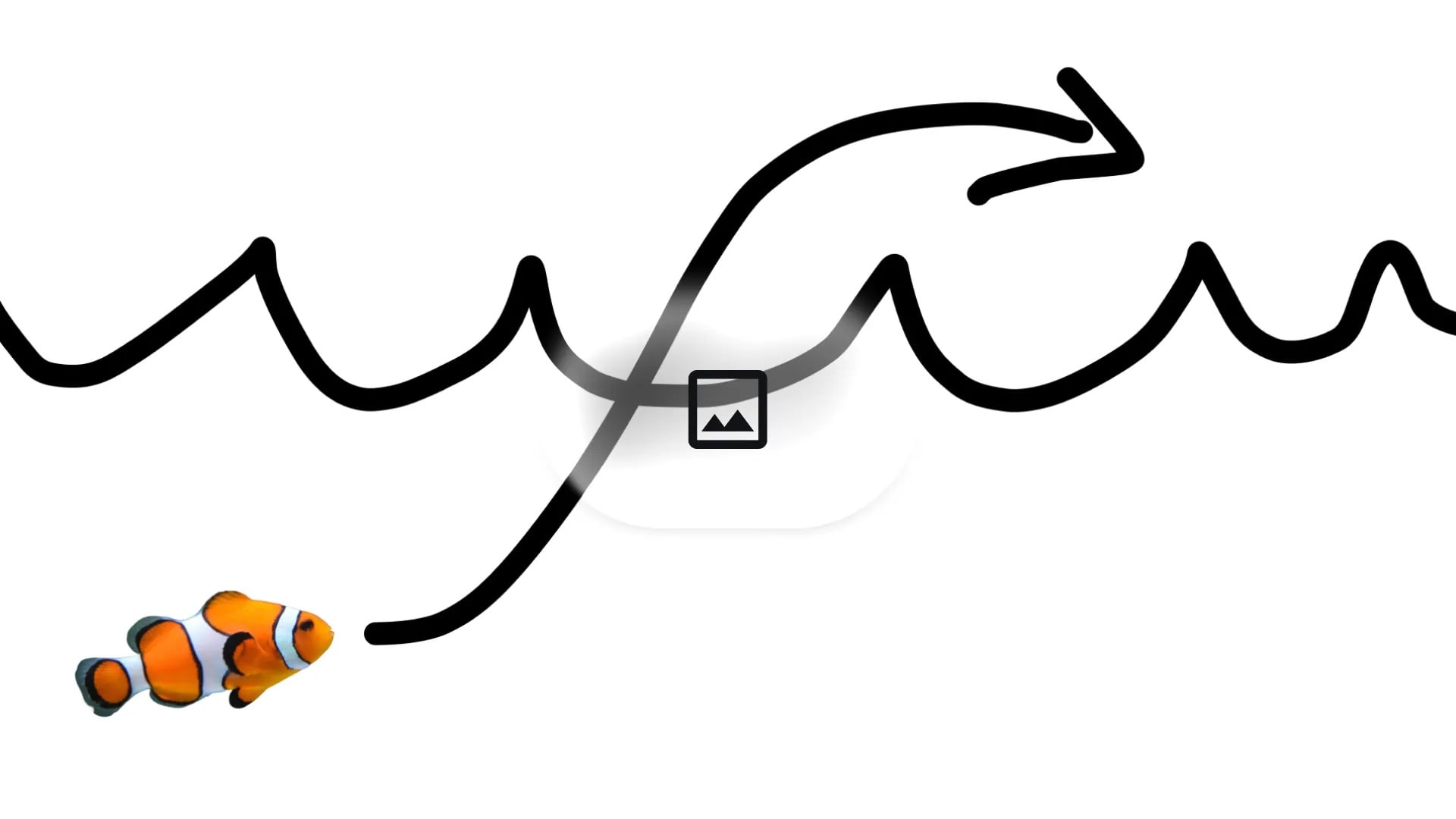 |
Turn this into realistic footage, using the drawing only as a guide for movement, do not show the drawing in the final video |
Image-Driven Character Swapping
Gemini Omni Flash seamlessly swaps characters or objects with reference images while flawlessly preserving key details—even keeping the original voice intact. For example, you can transform a person in a video into an anime character from a photo, while perfectly retaining their original voice, expression, and movements.
| Input |
 |
|
| Prompt | Turn me into this character | |
| Output video | ||
Gemini Omni Flash vs Veo 3.1 vs Veo 3
| Feature | Gemini Omni Flash | Veo 3.1 | Veo 3 |
| Input Modalities | Seamlessly combines text, images (up to 5), video, and audio inputs. | Text, images (upgraded image input capacity). | Text prompts, single images. |
| Native clip length | Up to 10 seconds | 4, 6, or 8 seconds | 4, 6, or 8 seconds |
| Multimodal input | Text, image,video,audio | Text, image | Text, image |
| World knowledge | Via Gemini | Limited | Limited |
| Resolution | High-resolution | Up to 1080p | Up to 1080p |
| Interaction Workflow | Allows iterative modifications to video appearance, motion, or effects via natural text/voice dialogue. | Advanced prompt-driven controls, including keyframe guidance | Single-turn prompting |
How to Use Gemini Omni Flash
- 1
Select the Gemini Omni Flash model
Go to the HIX AI video generator and select the Gemini Omni Flash model.
- 2
Enter your prompt
Input your prompt, upload your images, videos or audios.
- 3
Generate your video
Start the generation and get the output video in a moment.
YouTube Videos About Gemini Omni Flash
Reddit Posts About Gemini Omni Flash
Gemini Omni Flash nails the cozy nostalgic storybook look, and it holds through the motion
by u/Sniper_yoha in GeminiAI
Gemini Omni Flash turned a plain table into a shallow pool of water, ripples, refraction and sound included
by u/Few-Profession421 in GeminiAI
Design Arena: Gemini Omni Flash is now 1st overall on Video Arena with an Elo of 1404, and a 101 point Elo gap over Seedance 2.0 Mini.
by u/Recoil42 in singularity
X Post About Gemini Omni Flash
ChatGPT Images 2.0 × Gemini Omni Flash
— GENEL | AIを用いた動画制作 (@genel_ai) May 22, 2026
AIでテレビ風のテロップも生成可能👀
実際に使用したプロンプトはこちらの記事で紹介しています。 https://t.co/EsgR9Yv6gr pic.twitter.com/eiynv2TOsj
Edit any video with Gemini Omni Flash.
— Jerrod Lew (@jerrod_lew) July 5, 2026
Available everywhere and Google Flow, you can edit any video you have.
Adjust, modify, add VFX and animations whilst keeping your motion and the scene.
Some examples from my day out in NYC yesterday: pic.twitter.com/GmSo1lmke6
Google just quietly dropped something huge.
— Julian Goldie SEO (@JulianGoldieSEO) July 5, 2026
And almost nobody is talking about it yet.
It's called Gemini Omni Flash — an AI model that doesn't just make videos. It edits them too.
→ Most tools give you one clip, then you're stuck.
→ This one stays in the room with you.
→… pic.twitter.com/vjpMlZSuYN
The biggest OmniFlash feature isn't video generation.
— Julian Goldie SEO (@JulianGoldieSEO) July 6, 2026
It's memory.
Tell it:
→ Dim the lights.
→ Add a hat.
→ Change the background.
→ Turn the sculpture into bubbles.
It remembers everything that came before.
Only the requested change happens.
That's impressive. pic.twitter.com/967DuS7f98
omg… video editing just changed forever.
— Poonam Soni (@CodeByPoonam) July 5, 2026
Google absolutely cooked with GEMINI OMNI 🤯
Lets you edit any clip by describing what you want.
here's how to do it: pic.twitter.com/HiZwQkFLle
Use Gemini Omni Flash create graphics and fast-paced edits.
— Jerrod Lew (@jerrod_lew) July 2, 2026
I uploaded a photo of a car, and prompted Omni Flash to create a spec ad!
Here's the result, prompt in the comments! pic.twitter.com/kopPzEM6vR
Gemini Omni Flash pic.twitter.com/JbfnLxlpY2
— SEIIIRU😈動画生成AIを使う映像クリエイター (@seiiiiiiiiiiru) July 1, 2026
Midjourney Image Prompt
— Michael Rabone (@michaelrabone) July 2, 2026
Prompt and 4 images in first comment
Google Omni Flash Prompt
In Transformers movie style can you transform this submarine into a robot. No music. Only use mechanical transformation sounds. https://t.co/LdbuVJB9AK pic.twitter.com/q2QwlIC7kh
Never underestimate the sleepy guy!
— Mr Das (@MrDasOnX) July 2, 2026
Gemini Omni:
> A gigantic slow-moving sloth the height of a mountain hangs from a skyscraper, yawning massively. A furious elephant-Godzilla monster stomps toward it breathing tiny lightning. The sloth lazily reaches out one claw and… pic.twitter.com/eZEAIlNgpK

Discover Our Other AI Video Models
Try all the best video models in one spot.
