Choosing the right AI tool is frustrating when every platform seems to do the exact same thing. However, when you put Perplexity and ChatGPT to work on real-world research, writing, and problem-solving, their distinct advantages quickly stand out.
After incorporating both tools into my regular work, I’ve created a straightforward Perplexity vs ChatGPT comparison. Read on to find out which platform best suits your specific needs.
Table of Contents
🌟 Key Takeaways
Research & File Analysis: Deploy Perplexity to cross-check claims against live web sources, then use ChatGPT to translate approved documents into actionable team plans.
Content & Visuals: Leverage Perplexity for trend research and context gathering, then switch to ChatGPT to refine tone, rewrite drafts, and adjust visual mood.
Coding & Tech: Query Perplexity for live API documentation and version specs, then use ChatGPT for error debugging, logic testing, and code refactoring.
Strategic Synergy: Build a verifiable baseline with Perplexity first, then feed those verified sources into ChatGPT to synthesize final deliverables.
Perplexity vs ChatGPT at a Glance
| Task | Perplexity is a strong start when | ChatGPT is a strong start when |
|---|---|---|
| Research | You need current answers with citations to inspect. | You need to weigh findings, frame decisions, and revise a point of view. |
| Content Creation | You need a concise, source-aware brief or fact-based starting draft. | You need structure, voice, creative options, and several rounds of editing. |
| Coding | You first need recent documentation, examples, or technical context. | You need to build, explain, test, and debug through an iterative exchange. |
| Images | You want to research visual references or choose from available generation options. | You want to generate a concept, then refine or edit it conversationally. |
| Files | You need a formal, research-oriented summary tied to external context. | You need accessible takeaways, structure, and follow-up questions about a document. |
Perplexity vs ChatGPT: Which AI Tool Fits Your Workflow?
Perplexity handles live facts and deep research; ChatGPT excels at creation, code, and rich media. From file analysis to content generation, see how they stack up across your daily workflow.
For Research🔍
When the question is what is being reported or published now, Perplexity offers rapid orientation. It brings relevant coverage, primary materials, and the links behind claims into view, helping establish a factual baseline before interpretation begins to shape the answer.
Once evidence has been gathered or approved, ChatGPT is better placed to examine what it means. It can weigh competing interpretations, make trade-offs visible, and test whether an argument’s logic holds up. Used together, one maps the evidence; the other subjects its implications to scrutiny.
For Content Creation📝
For a fast-moving newsletter or industry briefing, Perplexity can turn current, cited material into a concise factual draft. It gives editors a practical bridge from research notes to publishable copy while keeping the reporting visible as the story develops.
That foundation leaves room for the next editorial step. Once facts are verified, ChatGPT is well suited to developing angles, shaping outlines, rewriting for specific audiences, and restructuring drafts that have grown unwieldy. Its flexibility helps turn accurate material into clearer, more persuasive communication.
For Coding⌨
When a developer needs to confirm how a library behaves today—or check official guidance before touching a version-sensitive API—Perplexity is the stronger starting point. Its source-backed results and linked documentation help ground decisions in current API changes and technical details where the latest record matters.
Once the work moves into implementation, ChatGPT is well suited to interpreting errors, weighing approaches, and drawing meaning from test results. It can also help sharpen code as debugging unfolds, improving clarity and maintainability without losing sight of the decisions made along the way.
For Image Generation🖼
A strong campaign image rarely begins with a prompt. Before a team commits to a visual direction, it may need cultural context, current references, and a test of an idea’s visual potential. Perplexity is most valuable at this exploratory stage, helping establish a research-informed brief before taste hardens into a decision.
Once the intended message is clear, the work becomes more tactile. ChatGPT is better suited to refining the chosen visual direction through revision—adjusting composition, mood, detail, and emphasis without losing the core idea. The distinction is not merely research versus generation, but deciding what an image should mean versus working out how it should look.
For File Analysis📁
When a document needs to be tested against the wider world, Perplexity brings a research-oriented lens. It places the file’s central claims alongside current external evidence and relevant sources, helping readers see where the document fits, what supports it, and what may need further scrutiny.
ChatGPT is better suited to carrying an approved document into day-to-day use. It can translate dense material into clear language, draw out the decisions and actions it suggests, and frame the questions a busy team should ask next—so readers can move from understanding the report to acting on it.
For Deep Research📖
Perplexity is the quickest route to a dependable research base: it surfaces relevant sources, keeps citations close at hand, and helps verify the essential facts. That transparent evidence trail is especially valuable when the subject is changing quickly and the underlying record needs to be checked, not merely summarized.
ChatGPT takes that evidence further, weighing what it suggests, exposing questions still unanswered, and shaping recommendations around the person who must act. Its value lies in turning researched material into a clear decision memo, strategic direction, or practical plan—without losing sight of the audience and the choice at hand.
The better choice depends less on the tool itself than on the task at hand. Use Perplexity to ground your work in current, verifiable information, and ChatGPT to turn that information into clearer thinking, stronger content, and practical next steps.
Perplexity vs ChatGPT: Which Tool Is Best for Your Role?
-
Journalists and Researchers
Start with Perplexity for timely reporting, primary sources, and competing claims, and inspect the underlying sources. After the reporting record is approved, move to ChatGPT to organize notes or shape a draft. Expected deliverables include source lists, fact-checked briefs, interview plans, or attributed drafts.
-
Marketing and Content Teams
Start with Perplexity for current market context, examples, terminology, and reference material. Then give ChatGPT the approved brief, voice guidance, and supported claims, and refine the work through editorial review. Expected deliverables include campaign briefs, article drafts, messaging variants, or content calendars.
-
Developers
Start with Perplexity for relevant documentation, issue discussions, and current implementation guidance. Then use ChatGPT to reason through design, write or revise code, and turn errors into debugging checklists. Expected deliverables include documented approaches, code changes, test plans, or troubleshooting notes.
-
Managers and Analysts
Start with Perplexity for external context, definitions, and decision-source material. Then use ChatGPT to turn approved inputs into scenarios, decision memos, meeting materials, or action plans. Expected deliverables include concise briefings, options tables, risk registers, or executive-ready recommendations.
Get the Best of Both Worlds with HIX AI
Every AI tool has its own strengths and limitations, and constantly switching between platforms for different tasks creates unnecessary friction in your workflow.
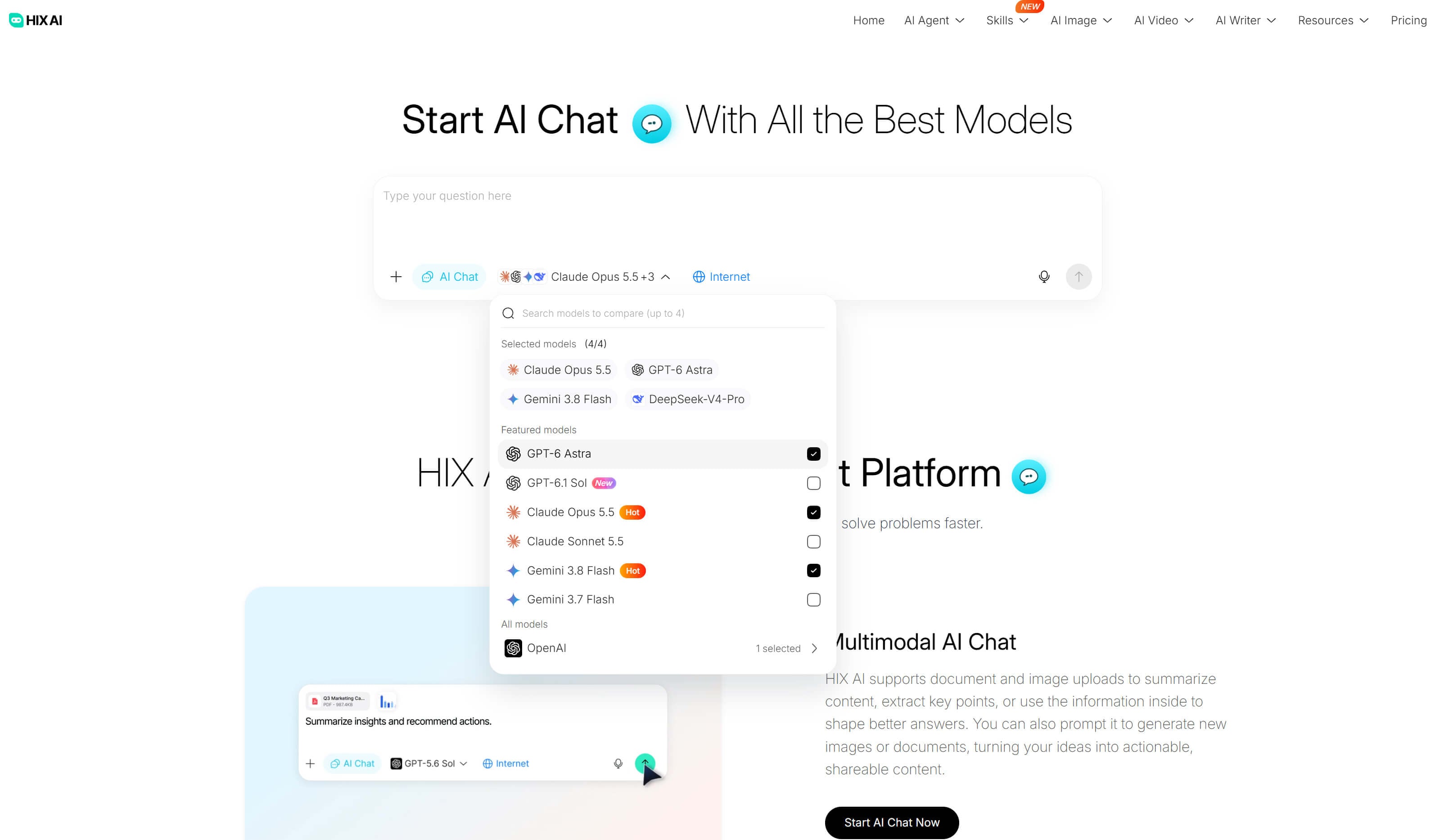
Stop switching tabs and paying for multiple costly AI subscriptions. HIX AI brings leading engines—including Claude, ChatGPT, and Gemini—together under one roof, giving you immediate access to the strengths of each model in a single workspace without the friction of individual model limitations.
For maximum efficiency, the HIX AI chat agent lets you run prompts across up to four models simultaneously on the exact same task.No more copying and pasting across browser tabs—your chosen models deliver responses side by side in real time on one unified screen.
This direct comparison transforms model evaluation into an effortless workflow. By benchmarking tone, reasoning, and accuracy side by side, you cut out tedious trial and error and consistently secure the optimal answer for your task.
Try HIX Al Chat Agent Now
Conclusion
There is no single "best" AI tool—only the one that best fits your specific needs. Choose Perplexity when you need real-time facts, verified news, and deep research, and reach for ChatGPT when you need a creative power-user for drafting, brainstorming, and coding.
If you prefer not to juggle multiple platforms mid-workflow, give HIX AI a try. It unifies real-time research, advanced writing, and coding into one seamless workspace so you can harness the strengths of top models without switching tabs.
⚡ Easy to Use • 💳 No Credit Card Required • 🌟 4.9/5 Rating