Hailuo AI Video Generator (MiniMax)

Hailuo AI is a popular AI video generator created by MiniMax., known as one of China's "AI six tigers". The tool is famed for delivering seamless and highly realistic physics simulations that bring dynamic scenes to life with exceptional accuracy and minimal randomness. Try Hailuo AI for free now!
Key Features of Hailuo AI
- Text to Video: Use text prompts to describe the videos you want to make, and let Hailuo AI generate clips that match your context.
- Image to Video: You can also upload still images and then breathe them into life with the help of the Hailuo AI video generator.
- Camera Movements: Enjoy total control over the camera movements in your AI clips – pan, zoom, and tilt as you desire.
- Subject Reference: The Subject Reference feature of Hailuo AI lets you upload characters to include in your videos consistently.
- Presets: Save time on all of your creative or professional AI video projects with handy time-saving templates.
Text-to-Video Generation
With the power of Hailuo AI text-to-video generation, all you need to make an amazing, realistic, detailed video is a piece of text. Just type in a description of the video you want to see, and then let the Hailuo AI video generator bring it to life before your eyes in a matter of minutes.
| Prompt | Generated Video |
| A man lounges on a couch in a softly lit room, taking a drag from his cigarette. | |
| Wild horses gallop freely across an expansive field on a sweltering summer day, as the camera gradually zooms in, capturing the herd in slow motion. |
Image-to-Video Generation
Hailuo AI users can also experiment with the tool’s image to video capabilities. This is where you upload an image, which basically serves as the first frame of your video, and the Hailuo AI model brings it to life. You can also add text prompts to gain more control over your clips.
| Input image | Text prompt | Output video |
 |
The cat laughs | |
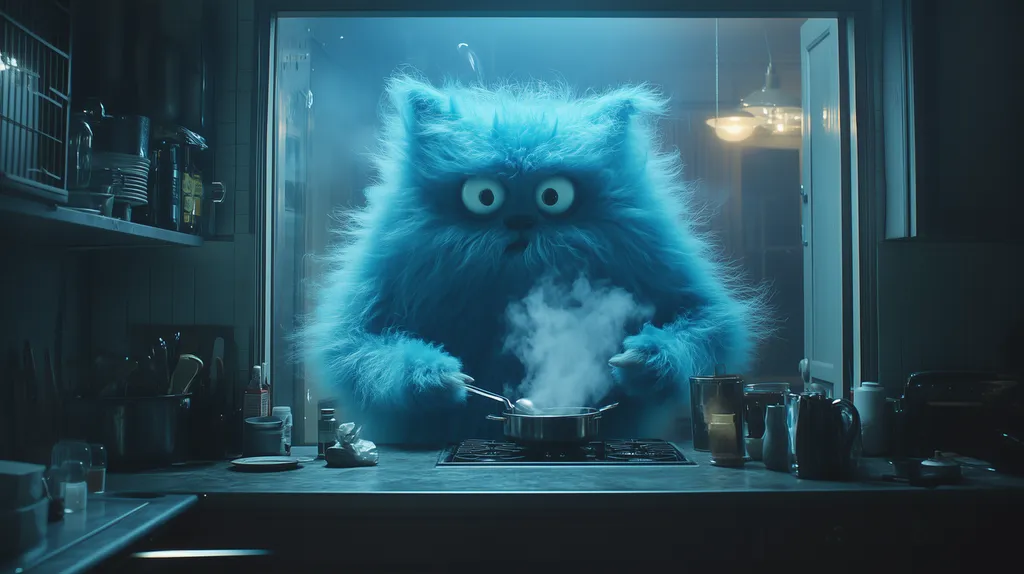 |
A blue furry creature in the scene is constantly stirring a steaming pot of soup. Then, the blue creature blows on the pot, causing the soup in the bowl in front of it to freeze into a block of ice. |
Camera Movement Controls
Hailuo AI also grants users full control over the camera in their AI videos. So you can really feel like a director as you make your clips, controlling how the camera moves across the scene, instructing it to zoom in or out, and so on.
| Text prompt | Output video |
| In a café, a girl is listening to the boy sitting across from her. Her expression starts off happy, suddenly turns to surprise, and then shifts to sadness. | |
| A woman walks toward the camera, crying, with the destroyed ruins of a city behind her. |
Subject Reference Mode
To make more consistent videos with the same characters, subjects, and scenarios, use the Subject Reference feature. This lets you upload an image of a character or object to include in all of your videos, which is great for making consistent series or sequences, like montages.
Time-Saving Presets
Hailuo AI video generator also helps its users out with handy time-saving templates, or presets. These configure a lot of the settings for you automatically, so you can instantly create fun clips to share on social media or enjoy with your friends more quickly and easily.
Hailuo AI vs Other Video Models
| Category | Hailuo AI | Google Veo 3.1 | Kling AI | Luma AI | Sora 2 | Vidu AI | PixVerse AI |
| Inputs | Text, image, subject reference | Text, image | Text, image | Text, image, video edit | Text, image, video extend | Text, image | Text, image |
| Max length | 10s | 8s | 15s | 10s | 12s | 16s | 10s |
| Resolution | 1080P | 720P, 1080P, 4K | 720P, 1080P | 540P to 1080p and 4K upscaling | 720P, 1080P | 360P to 2K | 360P to 1080P |
| Prompt adherence | 4/5 | 5/5 | 4/5 | 4/5 | 5/5 | 4/5 | 4/5 |
| Motion quality | 4/5 | 5/5 | 5/5 | 4/5 | 5/5 | 4/5 | 4/5 |
| Cinematic control | 4/5 | 5/5 | 4/5 | 4/5 | 5/5 | 4/5 | 4/5 |
| Standout features | Strong physics, lifelike motion, facial emotion, start/end frame control, fast image-to-video mode | Dialogue, ambient sound, music, strong physics and prompt control | First/last frame control, advanced physics, multi-shot consistency | Video-to-video, text-guided edits, reframe, natural motion | Multi-shot sequences, scene continuity, strong physics, audio generation | Reference consistency, fast scene generation, multilingual capabilities | Strong stylization, fast generation, motion control, template-based workflows |
| Best for | Short realistic clips, character motion, social content | High-end cinematic clips with sound | Controlled sequences, realistic motion, longer clips | Cinematic realism, edits, product shots | Premium storytelling and longer coherent scenes | Fast short-form generation, character consistency | Social content, stylized short videos, rapid experimentation |
How to Use Hailuo AI with HIX AI
- 1
Select the Hailuo AI Model
First, head to our AI image to video generator page, and choose Hailuo AI as the model you wish to work with.
- 2
Input Your Image and Prompt
Upload an image to provide the basis of your video, and then customize the various aspects of your clip, like length, aspect ratios, etc.
- 3
Create The Video
Click the Create button and wait just a few moments while the AI gets to work. You’ll soon see your video appear, ready to view, edit, save, share, etc.
YouTube Videos About Hailuo AI
What People Are Saying About Hailuo AI on X
Great morning!
— beholdersai (@beholdersai) May 7, 2025
May your day be a perfect blend of serene nature and sparkling inspiration ✨🌲💫#midjourney #hailuoai pic.twitter.com/WUaQ5j4C0a
This might be the most cinematic AI camera work I’ve seen yet. 😮🔥
— Kantrell B. (@kantrell_b) May 6, 2025
High-tech. Futuristic. Action-packed.🎥 @Hailuo_AI (T2V) crushed this one.
👇Full prompt below 👇#AIFilmmaking #KaijuCore #HailuoAI #AIcinema pic.twitter.com/tkDA2LfTFE
"Getting ready for the weekend with some sci-fi vibes! 🚀✨ Created with MidJourney and Hailuo AI. Whisper you all a fantastic Friday #SciFiArt #AIArt #MidJourney #HailuoAI #WeekendVibes pic.twitter.com/bhpIkMkRjg
— Dark OM (@DarkestOM) May 9, 2025
Beautiful landscpaes experiment ✨#aiart #hailuo_ai #suno #elevenlabs pic.twitter.com/CrLnxU5ejC
— lofipromt (@lofipromt) May 10, 2025
A new road is always waiting for us to win.
— WuxIA Rocks (@WuxiaRocks) May 12, 2025
Hailuo AI Director model pic.twitter.com/dB6A5H72me
Adaptation@Hailuo_AI pic.twitter.com/zp9CVfrMZR
— ZOOT (@LittleTinRobot) May 16, 2025
Hailuo AI’s Director mode is also great for creating videos with VFX on humans 🎬🔥 #Hailuo pic.twitter.com/Hcdi7uKjWq
— Pierrick Chevallier | IA (@CharaspowerAI) May 14, 2025

Discover Our Other AI Video Models
Try all the best video models in one spot.
