Haiper AI Video Generator

Haiper AI is a leading AI video generator founded by a pair of AI professionals who worked for DeepMind. It has received considerable funding, in excess of $13 million from various firms, including Octopus Ventures. However, Haiper AI’s web app has shut down as of early 2025.
Key Features of Haiper AI
- Text-to-video: Type in a text prompt to describe what your video should include, and the AI will accurately make it for you.
- Image-to-video: Upload your images to use as the basis of your AI videos, bringing still pictures to life through AI technology.
- Templates library: Haiper AI boasts a range of templates you can use as the basis for your AI video creations in styles like Hot, Meme, and Portrait.
- Video repainting: Adjust colors, textures, and elements of specific areas within your video scenes for cool customization effects.
- Camera controls: Control every aspect of your videos, including the camera. Pan, zoom, and tilt as desired to get the exact look you want.
- Pose and lighting adjustments: Supports dynamic pose and lighting adjustments, letting you make fine-tune changes to your videos.
- Rapid rendering: Generate most AI videos in a matter of minutes.
Text-to-Video Generation
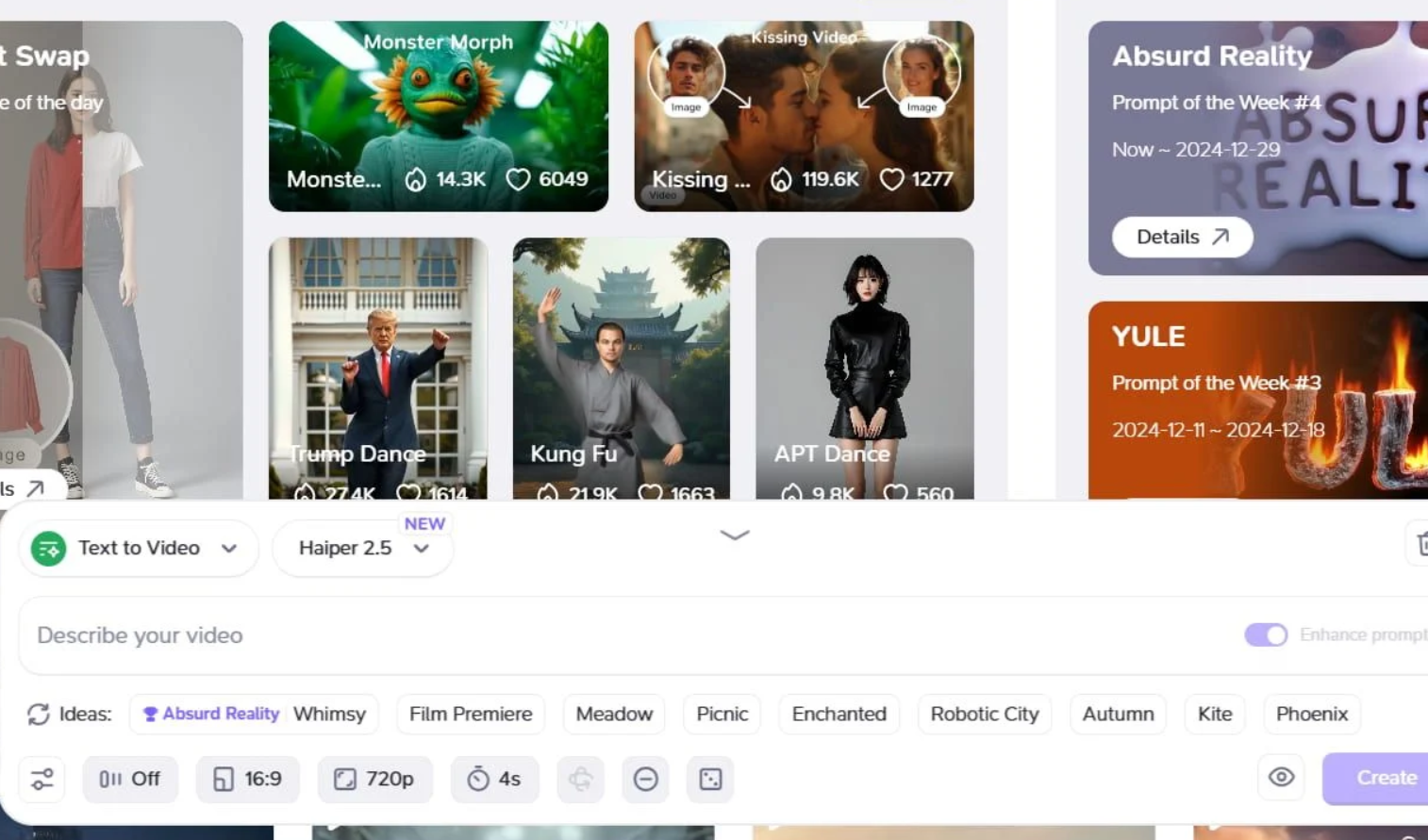
With Haiper AI’s text-to-video capacities, you only need to type in a piece of text to get an AI video made for you in minutes. It’s intelligent enough to understand complex, layered prompts, so you can go into detail about your subjects, settings, and scenarios.
Image-to-Video Generation
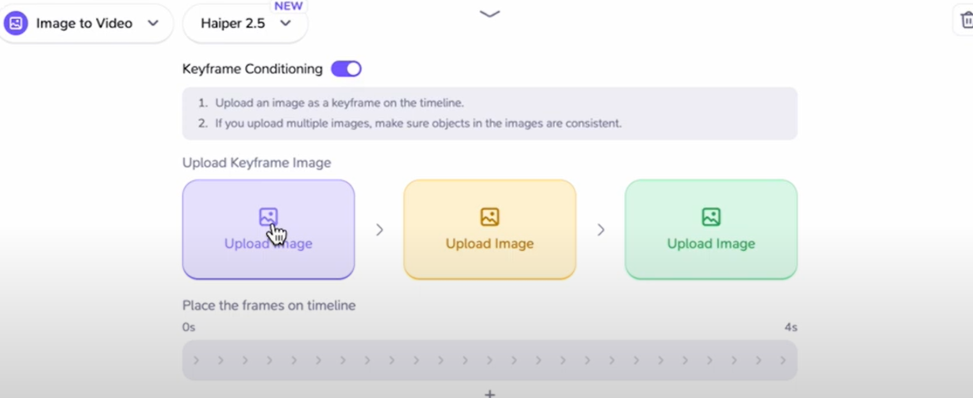
Users also have the power to breathe life into still images through Haiper AI video generation. You can upload one or more images to use as the reference points for your video, and Haiper will realistically and naturally bring those stills to life.
Video Templates Library
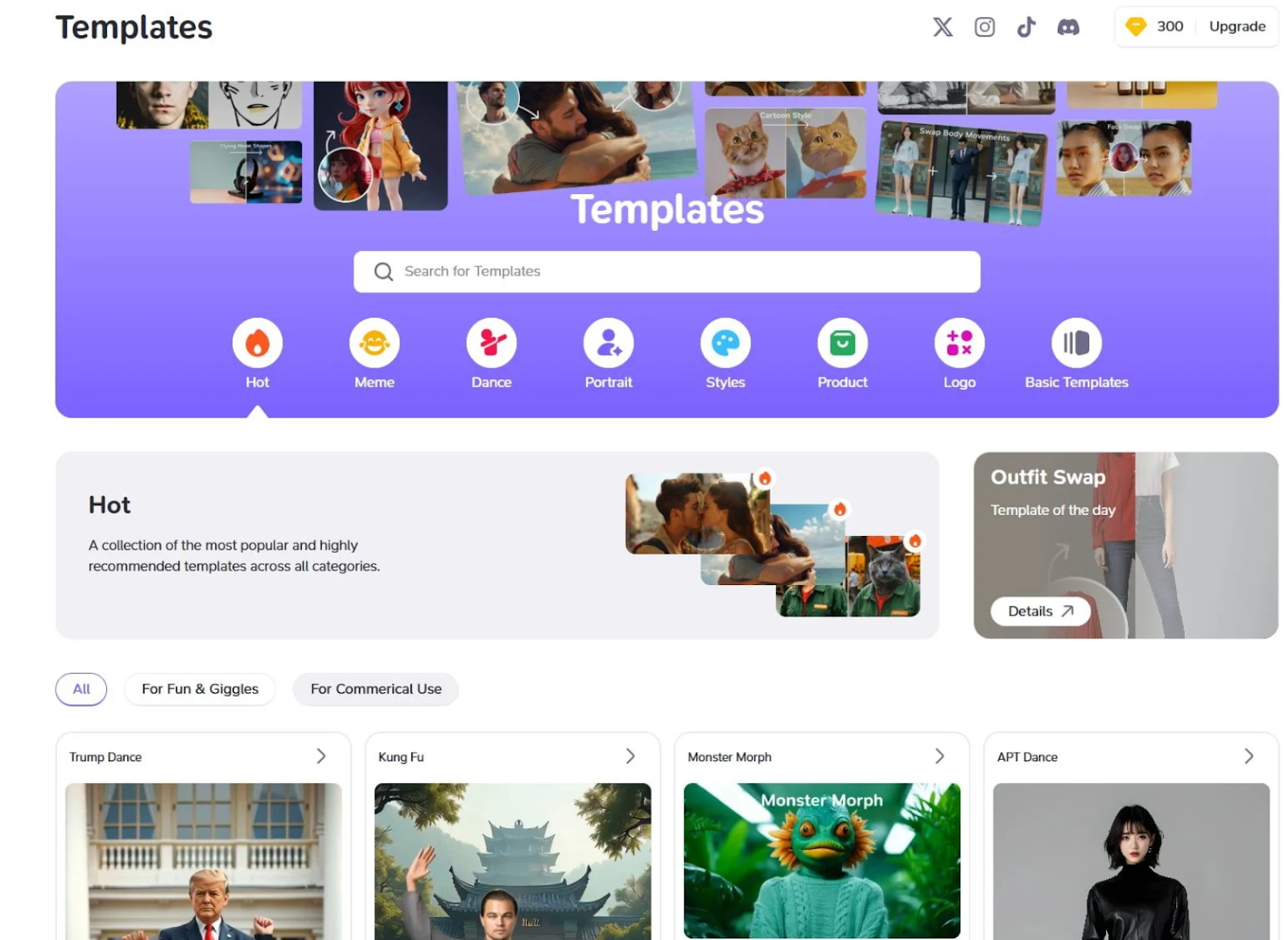
If you’re lacking ideas or need inspiration, or just want to save time when making AI videos, you can turn to the extensive Haiper AI templates library. This is packed full of helpful templates you can use to get started making AI videos of your own.
Video Repaint Tool
The Haiper AI Repaint feature basically lets you upload an image and then suggest ways to change it, like transforming a subject into a different form, changing the color of the background, and so on, to make videos feel more unique and vibrant.
Precise Camera Controls
Haiper AI gives you complete control over the camera in the AI videos you make. You can control how it pans and zooms across the scene, or just keep it still and fixed in a single place, if you prefer.
Pose and Lighting
To help users feel like professional-level directors of their own AI videos, Haiper AI also gives you control over subject poses and positions, as well as the lighting in every video you make. You can make small adjustments to transform the vibe and ambiance of your vids.
Rapid Video Creation
With Haiper AI video generator, you won’t have to wait around to get the videos you want. It’s super speedy, capable of processing inputs and generating brand new content in just a few minutes or less, most of the time.
Comparison of Haiper and Leading Video AIs
| Category | Haiper | Luma AI | Hailuo AI | Krea AI |
| Best for | Fast text/image-to-video and simple motion edits | Cinematic realism and camera control | Expressive motion and character realism | All-in-one access to multiple video models |
| Inputs | Text, image, video repainting | Text, image, video-to-video | Text, image | Text, image, first/last frame inputs |
| Typical output | Short HD clips with stylized or realistic looks | Cinematic clips with camera movement and strong visual coherence | Cinematic short videos with micro-expressions and smooth motion | Video clips generated through multiple underlying models |
| Standout strengths | Easy to use, quick generation, image animation, video repainting | Keyframes, visual references, camera concepts, video-to-video | Body movement, facial detail, fluid camera motion | One interface for several top models, quick iteration, video enhancement/upscaling |
| Main tradeoff | Less proven as a top-tier cinematic leader than the biggest premium tools | Less focused on playful effect tools than Pika | Less widely known than Runway or Pika | More of a hub/platform than a single model, so output can vary by backend |
How to Create AI Videos with Haiper AI?
Using Haiper AI is straightforward and involves three steps. Here is how it processes:
- 1
Describe Your Video
Enter the content you wish to use for generating your AI video.
- 2
Choose Your Preferences
Select the styles, duration or aspect ratio and more settings as needed.
- 3
Get Engaging Videos
Click the button and wait a few seconds for the video to appear.
Haiper AI Video Reviews
What People Are Saying About Haiper AI on X
Sora isn't available yet to all.
— Min Choi (@minchoi) April 9, 2024
But this tool has been trying to take the spotlight with high quality video output.
This is Haiper AI.
10 examples:pic.twitter.com/lyobpI13Om
文章だけで映画を作れる時代がすぐそこに!!
— ハルオミ (@HaruAiman) April 10, 2024
画像生成AIを使わなくても、AI動画作品は作れます!
この動画は「Haiper AI」の text to video で作られており、雷や炎などの表現が美しく見入ってしまいますね。
なんと言っても、Haiper AI は無料で使える!pic.twitter.com/w2KEyLPeny
リアル葬送のフリーレン!
— ハルオミ (@HaruAiman) April 27, 2024
Stable Diffusion を使って2D画像をリファレンスに3D画像を生成し、その後にHaiper AIで動画化されています!pic.twitter.com/erqh3Mixsd
GLORIOUS • David Archuleta
— Babush-kat (@Babush_kat_) May 4, 2025
Visuals & animation: Haiper AI (VEED platform) text-to-video#AI #AIart #aiartcommunity #aivideo #HaiperAI#Motivation #wholesome #Songs #songswelove
More videos 🔗⬇️ pic.twitter.com/tCY5t8DCVo
My very first prompt on Riffusion @riffusionai gave me this lovely song in the exact style I asked for:
— Lorenza 🧬 (@LorenzaTL) April 16, 2025
"Welcome Home". 🌼💕
Text-to-video animation: Haiper AI (VEED platform)#HaiperAI #Riffusion #AIMusic #aisong #AIart #aiartcommunity
Love for Ireland ☘️ playlist🔗⬇️
The… pic.twitter.com/v94c6dN4Op
🩷 La Vie en rose 🌸 Stella Jang 💕 스텔라장
— Lorenza 🧬 (@LorenzaTL) March 20, 2025
Animations by Haiper AI (VEED platform)#HaiperAI #AIart #aivideo #VEED#France #music #FrenchRetro
More videos⬇️ pic.twitter.com/njHNS09vRs
AI Experience: Using Haiper AI, I transformed this stunning NFT sneak peek from @RONINmythical, a free mint NFT community where I moderate, into an incredible video.
— Dayo (@dayodyor) October 20, 2024
Feel free to compare and see what magic Haiper AI has done
I thought I'd share this cutting-edge AI tool with… pic.twitter.com/QJJIJRKYPf
GLORIOUS • David Archuleta
— Babush-kat (@Babush_kat_) May 4, 2025
Visuals & animation: Haiper AI (VEED platform) text-to-video#AI #AIart #aiartcommunity #aivideo #HaiperAI#Motivation #wholesome #Songs #songswelove
More videos 🔗⬇️ pic.twitter.com/tCY5t8DCVo

Discover Our Other AI Video Models
Try all the best video models in one spot.
