Nano Banana 2.1 AI Image Generator

Developed by Google and released in October 2026, Nano Banana 2.1 delivers next-gen 4K AI image generation with hyper-accurate text rendering, rock-solid character consistency, and precise visual editing. Try Nano Banana 2.1 on HIX AI!
Key Features of Nano Banana 2.1
- Production-Ready Visuals: Generate crisp, realistic 2K imagery designed for rapid, high-frequency daily output.
- Character Consistency: Maintain a character's appearance across generated images.
- Text Rendering: Generate clearer, more accurate text across multiple languages.
- Photo Combination: Seamlessly blend multiple images into a unified visual composition.
- Precise Editing and Control: Fine-tune lighting, camera angles, reference styles, and scene elements.
- Enhanced World Knowledge: Create contextually accurate infographics, diagrams, and real-world visuals supported by web and image search references.
Production-Ready Visuals
Combining rapid generation efficiency with enhanced realism and visual fidelity, Nano Banana 2.1 produces crisp 2K resolution imagery with fast response times. By enabling seamless canvas resizing while preserving essential visual details, Nano Banana 2.1 empowers creators to efficiently generate social media posts, product ads, and e-commerce images tailored to any format.
Character Consistency
Nano Banana 2.1 consistently maintains product features, key attributes, and signature brand styling across every generated image and narrative panel. From high-end product photography to promotional posters and website banners, Nano Banana 2.1 delivers uncompromised visual accuracy across all asset types.
Text Rendering
Nano Banana 2.1 renders crisp, highly legible typography and precise lettering directly into visual compositions. From eye-catching promotional posters to elegant invitations and detailed comic panels, Nano Banana 2.1 ensures every word integrates naturally into the artwork with flawless clarity, dramatically minimizing the need for post-processing.
| Prompt | Output |
| Close-up photo of a "Bridal Brunch" invitation on thick textured cream paper, set on a sunlit wooden table. Features bold retro orange text, olive green script, and muted lavender/green floral graphics. A small lavender RSVP card is attached with a tied orange string bow. Soft natural light, high detail. |
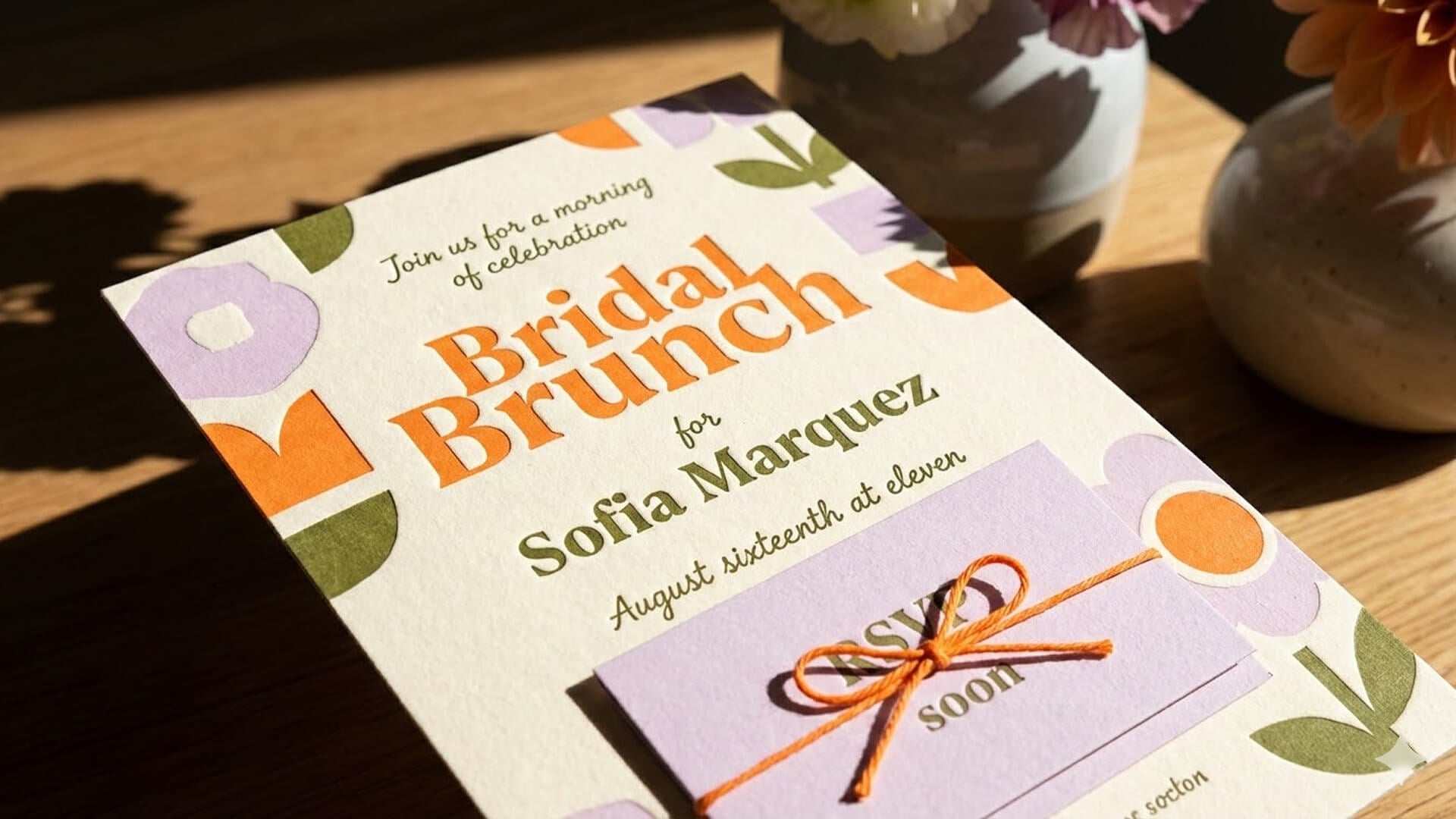 |
| Photo of vintage hand-painted gold & red lettering on a glass window: "Mexitaly TORNABUONI Strada 64 Bar and Restaurant". Features ornate 3D block & cursive fonts, intricate swirly flourishes with stars. Out-of-focus European street seen through the glass, warm evening lighting. Close-up, straight-on view. |
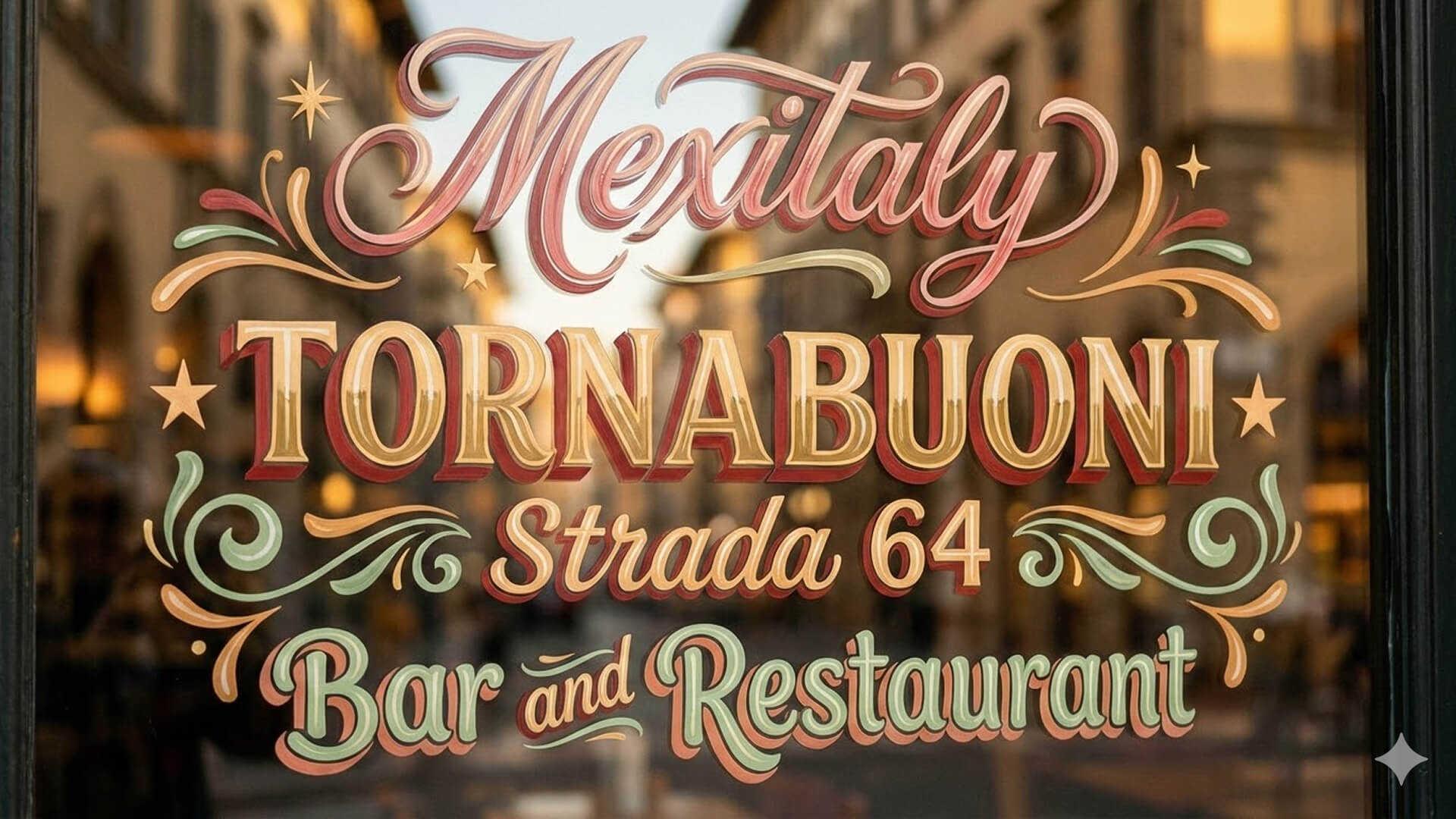 |
| A close-up photograph of an Art Nouveau stained glass window with "RIVIERA" in large, ornate swirling letters at the center. Intertwined with naturalistic olive green and amber vines, leaves, and flowers like irises and lilies. Features dark lead came outlines, textured, bubbly antique glass, and natural daylight diffused from behind. Straight-on view. |
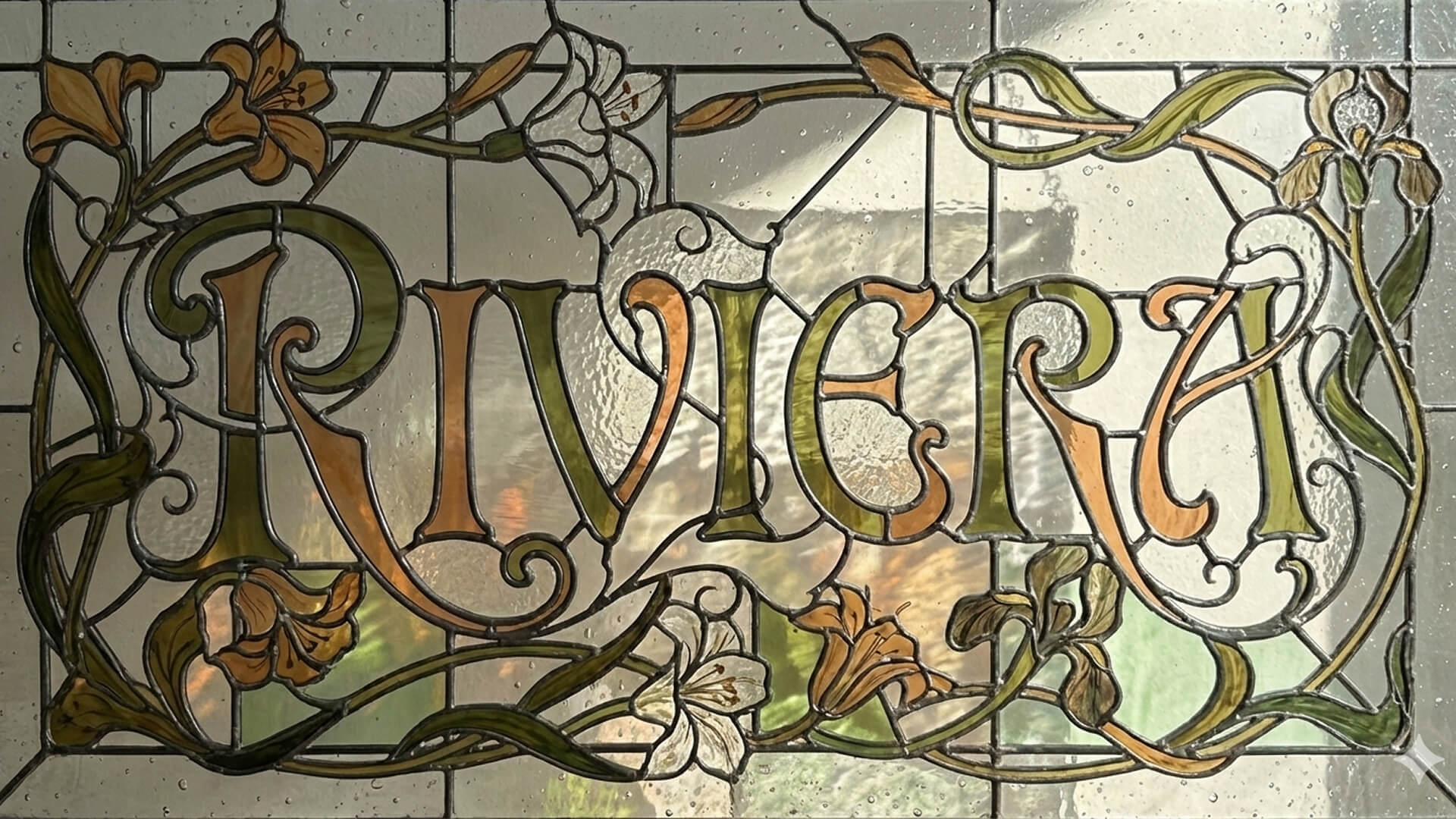 |
Photo Combination
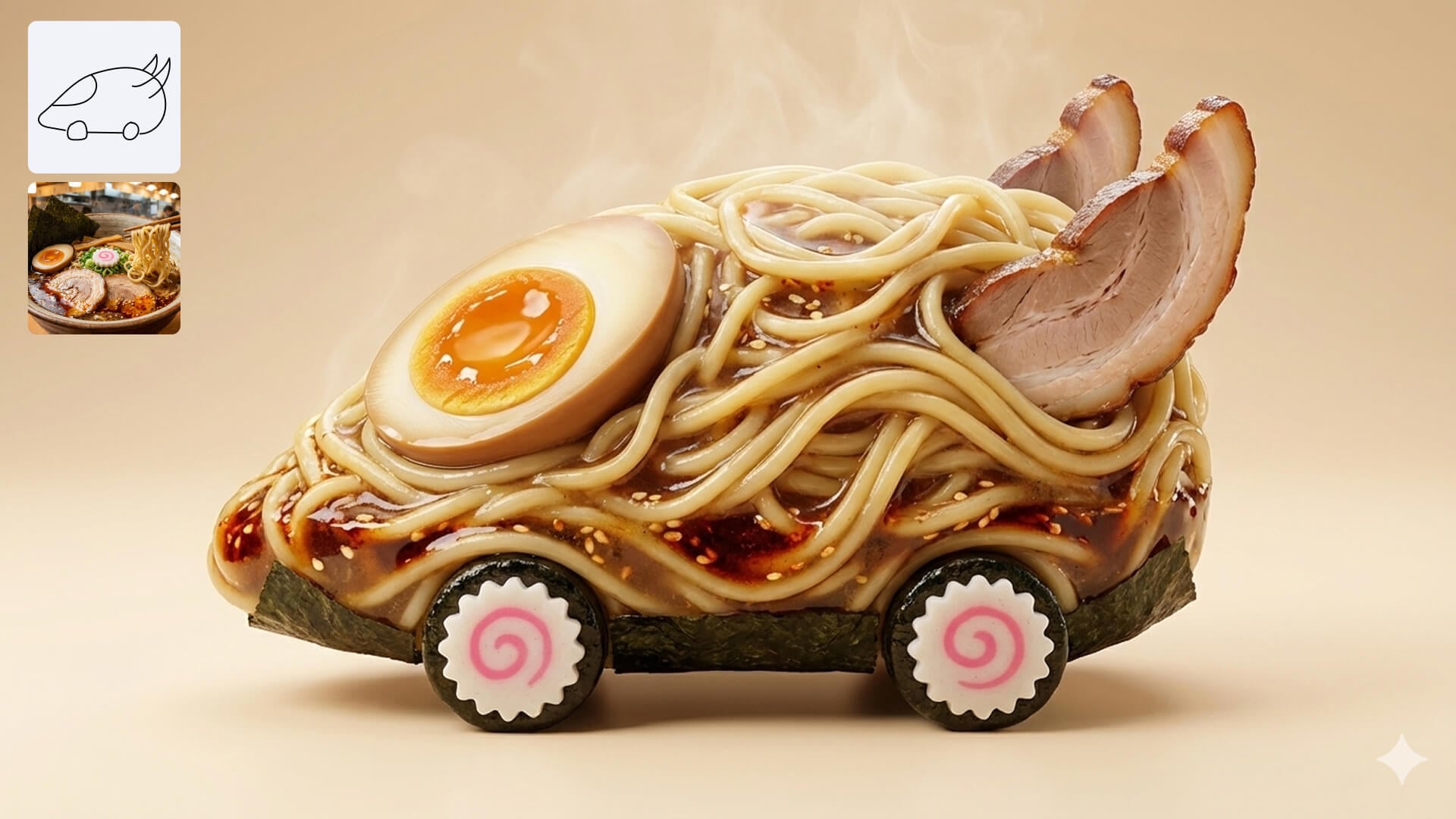
Nano Banana 2.1 seamlessly merges distinct uploaded images while harmonizing layout, lighting, and artistic style. By effortlessly applying the texture, color, and aesthetic of any reference photo onto a new subject, Nano Banana 2.1 eliminates the need to start from scratch. Creators can instantly experiment with diverse visual styles, transforming everyday concepts into polished, stunning artwork.
| Prompt | Output |
| A 3D studio shot of a futuristic vehicle, combining the whimsical, rounded toy car shape from the sketch in image 1 with the bioluminescent, translucent organic texture of the jellyfish in image 2. |
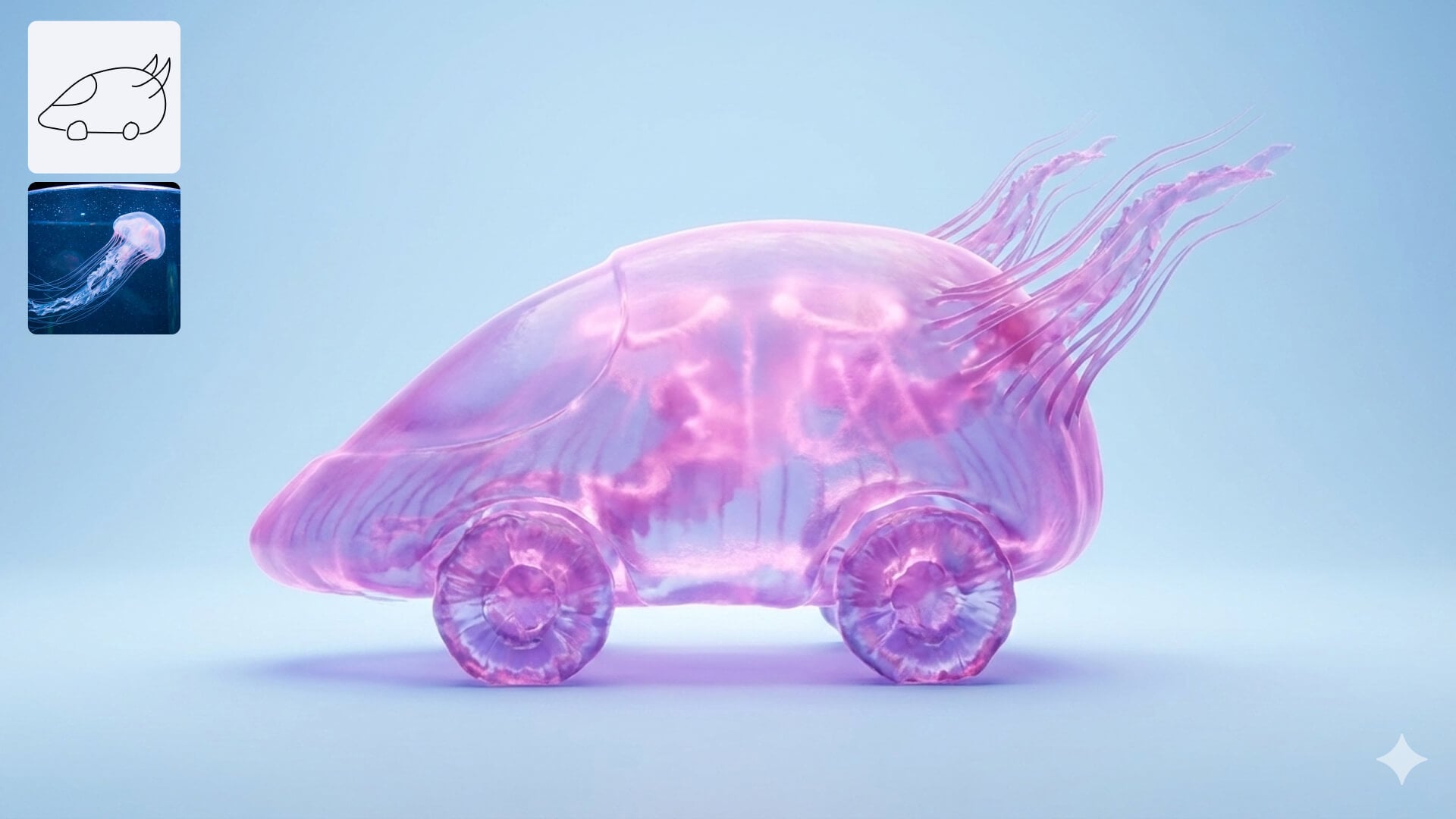 |
| A studio photography shot of a 3D food-art vehicle, combining the hand-drawn futuristic car shape of the sketch image 1 with the rich, savory ramen noodle ingredients and textures image 2. |
 |
Precise Editing and Control
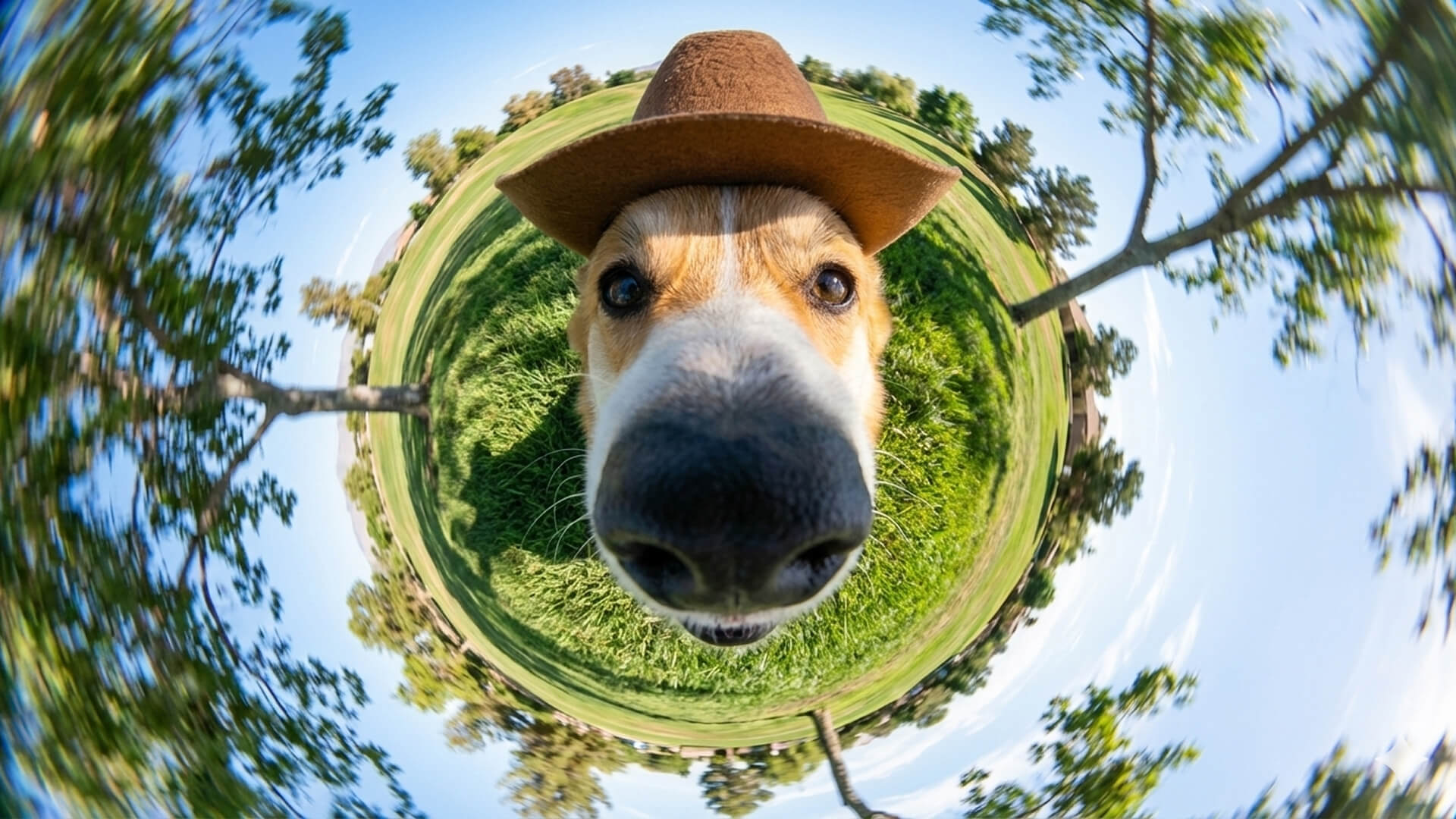
From shifting camera angles and lighting to transferring reference textures and adding new visual elements, Nano Banana 2.1 brings unparalleled precision to image editing. It puts full creative command back in your hands, ensuring every detail aligns perfectly with your vision.
| Image 1 | Prompt | Output |
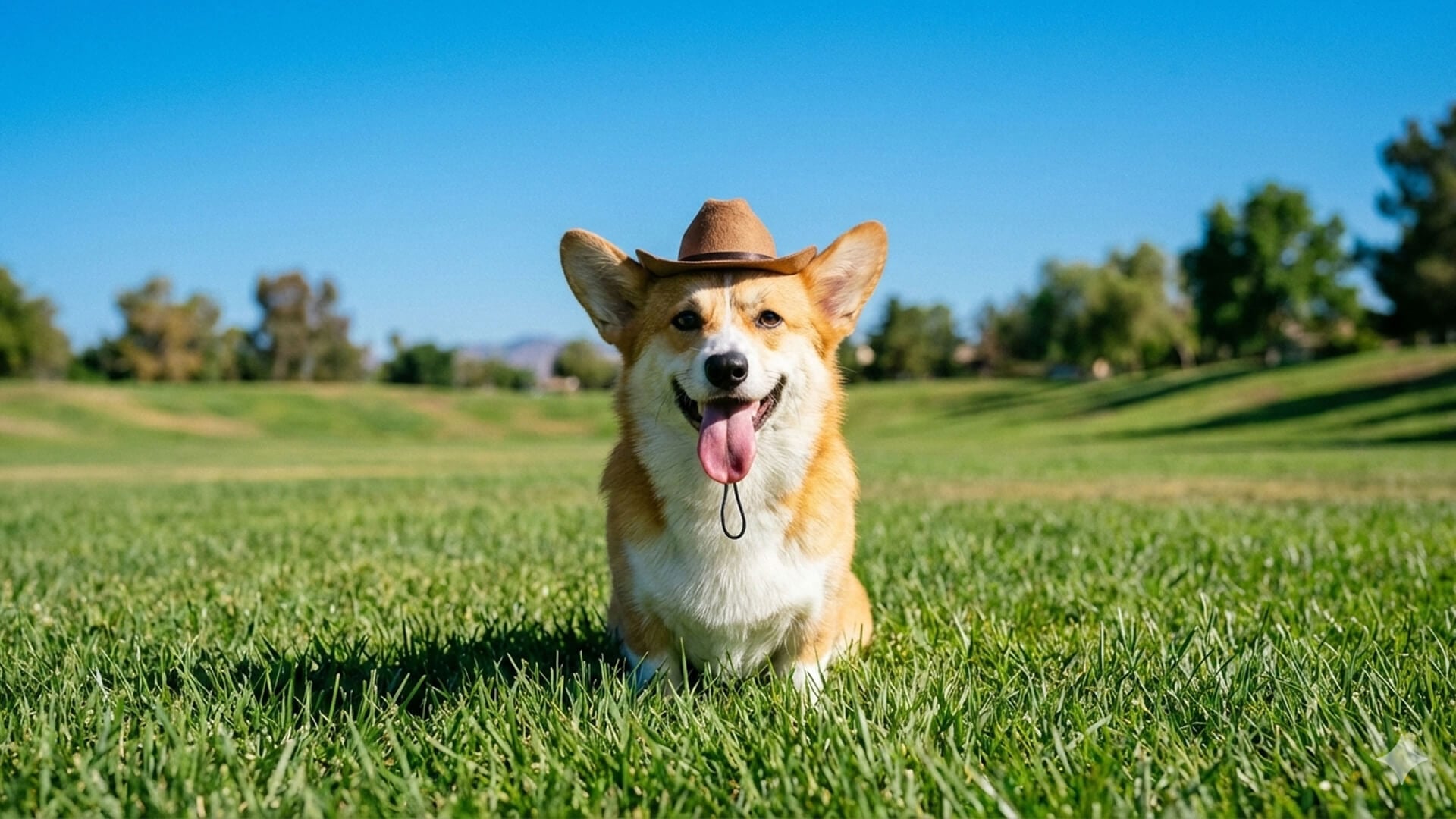 |
Edit image 1 by transforming its perspective from a standard photograph to an extreme, immersive 360-degree fisheye "tiny world" lens view, captured from an ultra-close-up, low angle. Zoom and crop in tightly on the corgi so its snout and nose appear huge, bulbous, and dominate the center-bottom of the frame, with only its eyes and brown cowboy hat visible just above. Warp and bend the surrounding park—including the grassy field, scattered trees, and the blue sky—into a swirling, circular vortex that completely encircles the dog's head, creating a globular, spherical effect. The scene should shift from a static outdoor portrait to a whimsical, dizzying, and dynamic wide-angle action shot, preserving the natural daylight. |
 |
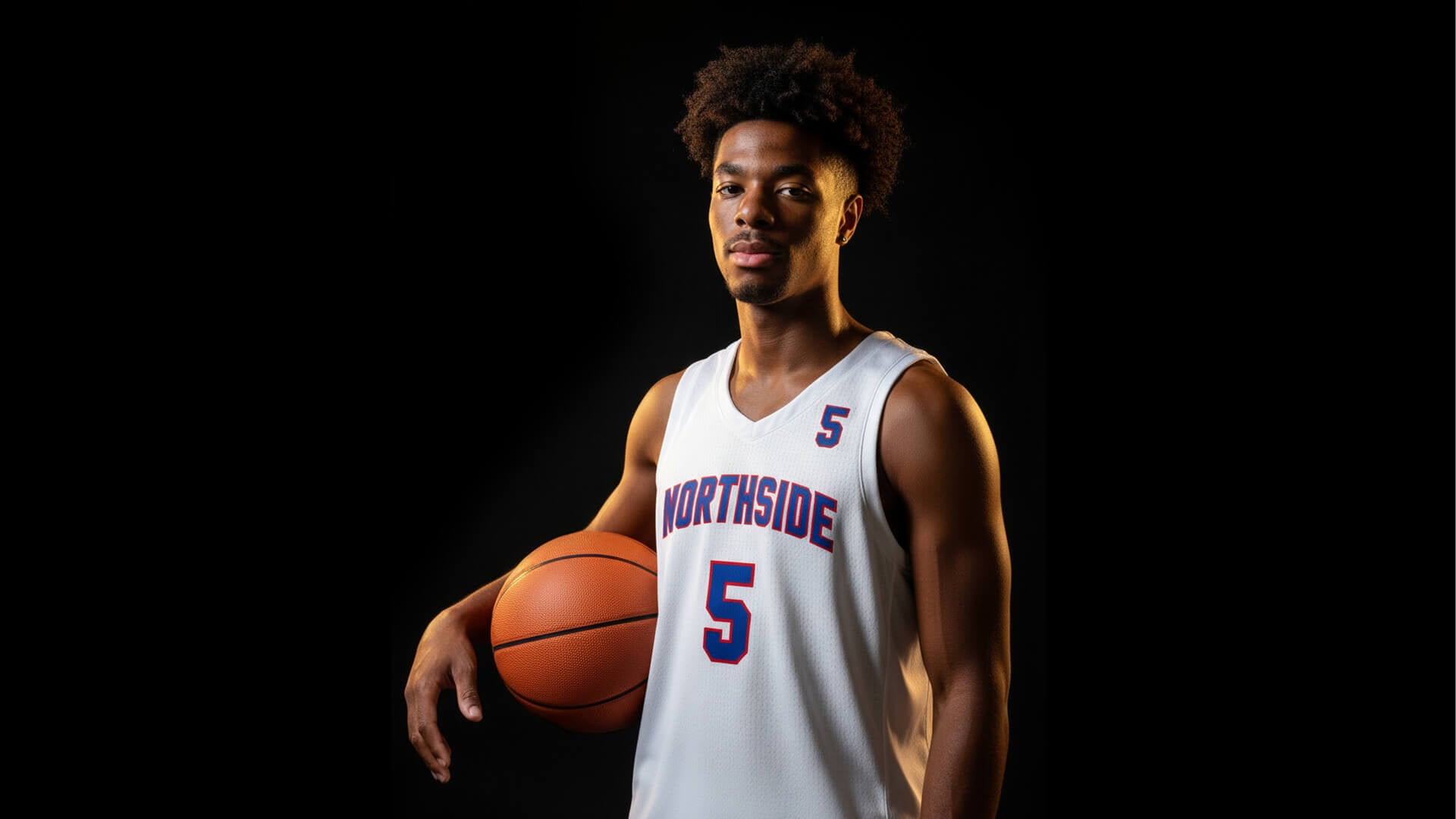 |
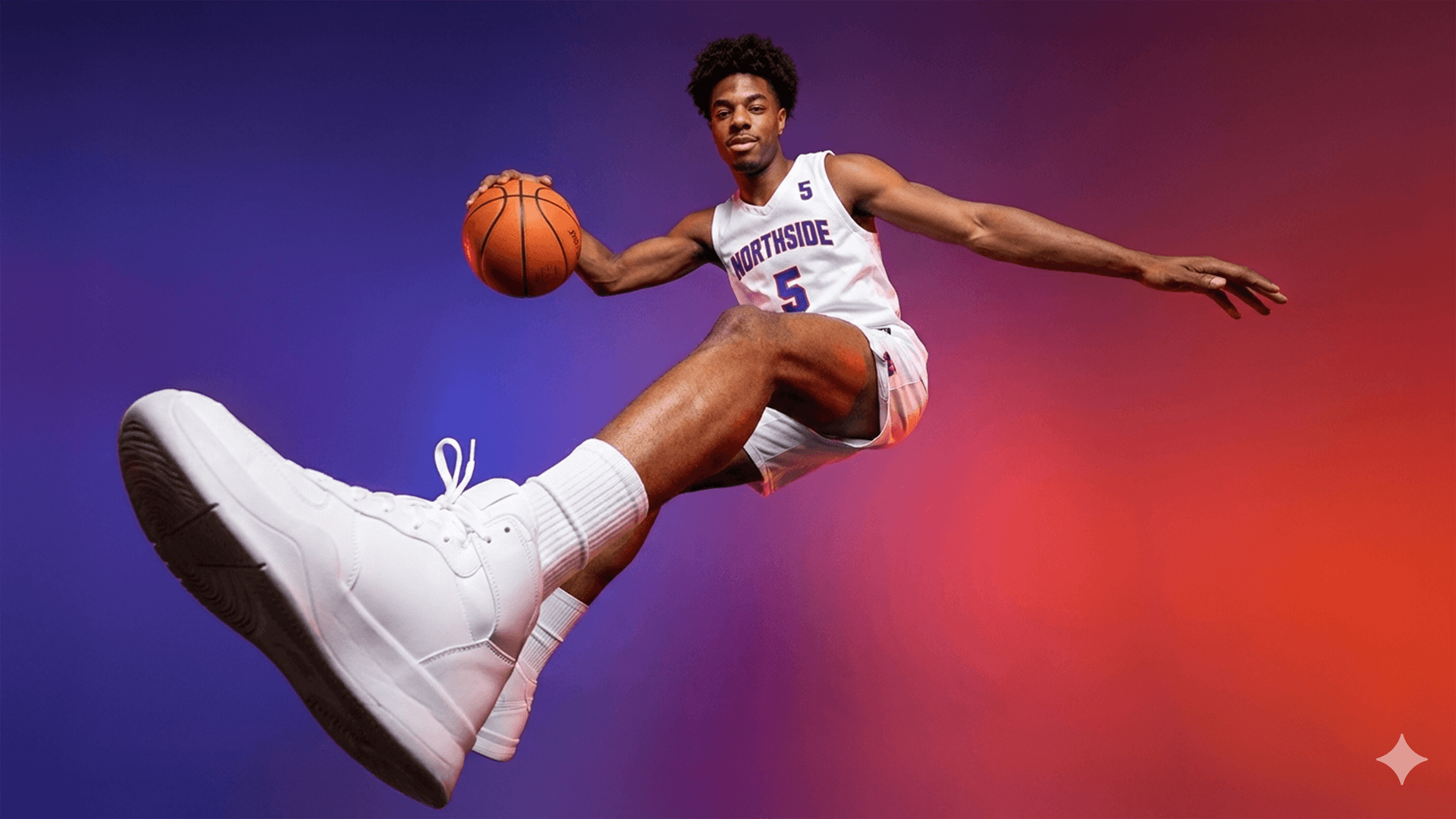
Edit image 1 to transform the static half-body portrait into a high-energy, full-body jumping action shot. Repose the basketball player mid-air, leaning back dynamically in matching white shorts. Change the camera to an extreme low-angle, wide-perspective shot, making his thrusting right leg and white high-top sneaker appear massive in the bottom-left foreground. His other leg is bent, his left arm outstretched to the right, and his right hand dribbling the basketball on the left. Replace the black background with a vibrant, hazy gradient of deep purple on the left and fiery red-orange on the right, enhanced by dramatic blue and orange rim lighting on his body. |
 |
Enhanced World Knowledge
Combining expanded global knowledge with Google Web and Image Search, Nano Banana 2.1 delivers precise, reference-backed visual representations. By bringing factual depth and visual accuracy to complex subjects, Nano Banana 2.1 serves as the ideal solution for nature communication and knowledge-driven infographics.
Why Create with Nano Banana 2.1 on HIX AI
Ready to experience the full image generation power of Nano Banana 2.1? Try it on HIX AI to unlock its complete creative potential and maximize every feature seamlessly.
- Seamless Style Comparison on Infinite Canvas: Unlock precise control and crisp, high-resolution generation with Nano Banana 2.1. By pairing these capabilities with the infinite canvas on HIX AI Image Agent, you can easily review multiple outputs side-by-side and quickly choose the best image for your needs.
- Effortless Text-Based Editing: Edit images effortlessly using quick text instructions on HIX AI Image Agent, putting the full precise control of Nano Banana 2.1 right at your fingertips.
- Seamless Brand Consistency: By uploading your logo or brand kit directly to HIX AI Image Agent, you can leverage Nano Banana 2.1’s exceptional visual consistency to effortlessly generate diverse, perfectly on-brand product images.
- Explore More Top-Tier AI Image Models: Beyond Nano Banana 2.1, HIX AI gives you access to a full suite of cutting-edge image generation models, including GPT Image 2.5, Seedream, Midjourney, and more—all within a single platform.
Nano Banana 2.1 vs Other AI Image Models
| Aspect | Nano Banana 2.1 | Nano Banana 2 | GPT Image 2.5 | GPT Image 2 |
| Provider | OpenAI | OpenAI | ||
| Release Date | October 2026 | February 2026 | September 2026 | April 2026 |
| Resolution | Up to 4K | Up to 4K | Up to 4K | Up to 4K |
| Text Rendering | ⭐⭐⭐⭐⭐ | ⭐⭐⭐ | ⭐⭐⭐⭐⭐ | ⭐⭐⭐⭐ |
| Core Strengths | Flawless multi-angle character retention, hyper-accurate text rendering, and precise targeted editing | Reliable character tracking, fast reference style matching, and consistent mood preservation | High-precision element protection, zero-distortion facial preservation, and rock-solid multi-turn edits | Solid subject recognition, dependable aesthetic continuity, and stable color palette alignment |
How to Use Nano Banana 2.1 on HIX AI
- 1
Select Nano Banana 2.1 Model
Choose the Nano Banana 2.1 model within the HIX AI image agent
- 2
Add Prompt & Reference
Enter a text prompt describing your desired image, and optionally upload reference photos to guide the visual outcome.
- 3
Download & Share Instantly
Instantly export your high-quality images and share your creations effortlessly across all platforms.
YouTube Videos About Nano Banana 2.1
Reddit Posts About Nano Banana 2.1
X Post About Nano Banana 2.1
Meet Nano Banana 2.1, our latest image generation and editing model 🍌 This upgraded version outperforms our previous models across the board, with notable leaps in visual design, mask-based editing, and subject consistency to help you create more natural-looking images.
— Google (@Google) October 6, 2026
Google Nano Banana 2.1 vs ChatGPT Images. There is no competition. Nano Banana 2.1 is cheaper, 5x faster and better. As far as I’ve tested, it does great with realistic image generation and is very good at image editing too. https://t.co/nPie1DGhsd
— AshutoshShrivastava (@ai_for_success) October 6, 2026
Google's Nano Banana 2.1 takes #4 on both AA-Image-T2I v2.0 and AA-Image-Editing v2.0, at half the price of Nano Banana 2 Nano Banana 2.1 is Google's new image model, released on October 6. It is based on Gemini 3.6 Flash and replaces Nano Banana 2 (Gemini 3.1 Flash Image) on the Gemini API. It supports both Text to Image and Image Editing in one model. We evaluated Nano Banana 2.1 through the Gemini API at 1K resolution with default settings. Nano Banana 2.1 is a significant improvement over Nano Banana 2: it ranks higher in all 16 of the generation and editing capabilities we measure, with the largest gains in the Retail & Ecommerce and Productivity & Knowledge Work use cases. Nano Banana 2.1 is priced at 0.0336perimage(33.6 per 1k images) at 1K resolution on the Gemini API. That is half the 1K price of Nano Banana 2, and the lowest price among the top 7 models on AA-Image-T2I v2.0. At 2K it costs $0.0504 per image, and at 4K $0.0756 per image. Nano Banana 2.1 is available in the Gemini app, AI Mode in Search, Google AI Studio, Flow, Stitch, Google Ads and Gemini Enterprise Platform, through the Gemini API and Vertex AI, and on third-party providers. Congratulations to @GoogleDeepMind & @Google on the release! See below for our detailed analysis and example outputs of Nano Banana 2.1 in the Artificial Analysis Image Arena 🧵
— Artificial Analysis (@ArtificialAnlys) October 8, 2026
Introducing Nano Banana 2: Our best image generation and editing model yet. 🍌 Pro-level quality, at Flash speed. Rolling out today across @GeminiApp, Search, and our developer and creativity tools.
— Google (@Google) February 26, 2026
Google「Nano Banana 2.1」 複数人物の一貫性・編集精度が上がってますね👀 同じプロンプトで参照画像の8人をソファに座らせる比較。 1枚目:Nano Banana 2.1 2枚目:Nano Banana Pro 3~4枚目:参照画像 2.1は、8人それぞれの一貫性を保ったまま、かなり自然に配置◎ https://t.co/wyAwPK1OoQ
— GENEL | リアルなAI動画制作 (@genel_ai) October 7, 2026
Nano Banana 2.1 just dropped. Hype or actually great? I ran it against GPT Image 2.5 Sunburst. Same prompts, same product, same canvas. 13 rounds, no cherry-picking. 5-minute breakdown 👇 Full prompts + every pair in the thread. https://t.co/MoLdocFMm6
— Wanderson Jackson (@jackson99ai) October 7, 2026
"Second World" via Nano Banana 2.1 prompt by @hx831126 Complete JSON Prompt v1.2 After uploading the photo, pass the entire following segment to the image model. Generate independently for each photo. { "name": "Second World", "version": "1.2", "task": "Using each uploaded photo as an independent source, generate one complete poster per photo. Do not merge multiple photos onto the same canvas.", "output": { "aspect_ratio": "3:4", "orientation": "vertical", "one_poster_per_photo": true, "layout": "Canvas horizontally divided at exactly 50% height, with upper and lower sections each occupying 50%, same width", "no_mockup": true }, "core_principle": "The Second World is already hidden in the photo. Let the same scene pass through the midline and continue downward, changing only the physical rules in the lower half. Continuity of the cross-boundary structure is the highest visual priority.", "upper_half": { "source": "The current uploaded photo", "preserve": [ "Subject identity and appearance", "Character poses, expressions, and actions", "Spatial relationships, proportions, and perspective", "Original color atmosphere", "Natural lighting and shadows", "Environment and important details" ], "allowed_change": "Only necessary proportional cropping to fit the upper half, avoiding cutting off key subjects or connection structures", "forbidden": [ "Redesigning the photo", "Redrawing or replacing the subject", "Rearranging characters and objects", "Changing the photo's colors", "Fictional lighting or background" ], "fidelity_rule": "Prioritize directly reusing the original photo; do not claim generative redrawing as lossless preservation of the original. If the tool cannot meet original preservation and precise layout, state the limitations—do not lower requirements and claim full compliance." }, "continuity": { "choose_one_source_structure": "Identify a structure from the original photo that can naturally extend to the midline, such as a road, shoreline, water surface, reflection, tree branch, light beam, architectural line, clothing flow, or body movement", "requirements": [ "The structure must continue into the lower half at the exact midline meeting point", "Maintain believable continuity in direction, position, scale, and occlusion relationships", "Establish a visible connection first, then develop the lower half's imagination", "Both halves must read as the same scene, not like two independent images stacked vertically" ], "transition_edge": { "optional": "Allow irregular torn paper edges", "rule": "Tearing must follow the original image's structure, not just as decoration, and avoid using the same tearing shape for every image", "interaction": "Source elements can touch, cling to, pass through, or cross over the torn edge" } }, "lower_half": { "background": "Warm ivory paper texture, with subtle visible fibers, rich negative space", "media": [ "Restrained photo fragments", "Simple cut-paper shapes", "Minimal black hand-drawn lines" ], "construction": "Extend downward from where the upper half's source structure meets the midline, then gradually reinterpret it as the Second World", "prohibited": "Do not turn it into an isolated entrance, window, stage, platform, or floating vignette, unless the form clearly grows continuously from the original photo", "density": "Bright, airy, restrained—avoid dense drawing or collage buildup" }, "second_world_logic": { "question": "If the structure in the photo could be touched, used, entered, folded, stretched, or changed, what would it naturally become?", "interaction_count": 1, "instruction": "Establish only one specific, clear, and interesting interaction per image, prioritizing possibilities discovered from the original image's shapes and actions, not reverse-engineering from fixed props or templates.", "examples_for_logic_only": [ "Water surface remains connected to the lake while being rolled up or stretched", "Road extends onto the paper, becoming a path that can be continued by drawing", "An existing light beam extends downward, becoming something gently graspable" ], "variation": "Judge each work individually—do not mechanically repeat actions, connection structures, compositions, or jokes. Examples are not required content." }, "tiny_figures": { "count": "0–3", "appearance": "Minimalist, tiny black line figures", "add_only_if": "Figures can engage in necessary and explicit physical interaction with the extending structure", "omit_if": "Source photo already contains strong human actions", "forbidden": "Using little figures as irrelevant decorations or adding crowds just for liveliness" }, "copy": { "language": "Primarily Chinese, paired with a short English accent", "main_text": "A short, witty, cute, humorous Chinese marginal note, or one with a slight surprising insight", "english": "Shorter, lighter English supplement; can complement the Chinese without word-for-word translation", "intent": "Make viewers smile knowingly after seeing the image and then the small text, or suddenly understand one more layer", "requirements": [ "Recreate based on this photo's specific interaction with the Second World", "Don't just name the action or mechanically describe the image", "Can include anthropomorphism, slight contrasts, deadpan little jokes, or gentle self-deprecation", "Can have a wake-up-call vibe, but no grand life lessons", "Don't force self-love, motivational, or emotional comfort templates", "Humor targets the situation, without belittling characters' appearance, identity, or circumstances" ], "avoid": [ "Vague inspirational fluff", "Grand maxims", "Preachiness", "Ad slogans", "Irrelevant internet memes", "Fixed 'same..., different...' sentence structures", "Reusing the same copy for every image" ], "examples_for_tone_only": [ { "context": "Taking away the sunset", "chinese": "这个不算超重吧", "english": "just a little sunset" }, { "context": "Rolling the lake surface into a paper ribbon", "chinese": "不用袋子,我卷着走", "english": "no bag, thanks" }, { "context": "Shadow rolled into a bed corner", "chinese": "影子先躺了,我再走会儿", "english": "five more minutes" } ], "example_rule": "Borrow only the humor mechanism—do not fix example sentences into new works." }, "handwriting": { "scale": "Small marginal notes, English even smaller—no huge titles stealing the scene", "placement": "In natural white space, not obscuring subjects, cross-boundary connection points, or key interactions", "chinese": "Truly natural, slightly messy handwriting, not neat computer-generated script", "english": "Similarly like casually scribbled, relaxed and irregular", "details": [ "Slight variations in character size", "Baseline with minor undulations", "Tilt angles not perfectly consistent", "Natural variations in spacing", "Strokes with pressure and pauses", "Minimal overlapping or incomplete ink traces" ], "corrections": { "allowed": true, "frequency": "Occasional only—not required for every image", "method": "Can gently strike through a mistaken or revised word, adding the correct version nearby or above", "limit": "Usually at most 1–2 instances—don't turn the whole page into a repeatedly scribbled draft", "legibility": "Final meaning must be clear—no simulating handwriting with gibberish or meaningless errors" } }, "overall_style": { "mood": [ "Indie magazine vibe", "Bright and airy", "Warm paper texture", "Restrained", "Lightly humorous", "Subtle handmade traces" ], "hierarchy": [ "Original photo and cross-boundary structure", "Clear interaction in the lower half", "Small bilingual handwritten marginal notes" ], "finish": "Like gently unveiling a hidden world in the photo, not pasting an extra illustration below it" }, "negative_prompt": [ "Detached lower-half illustrations", "Broken cross-boundary continuity", "Generic torn-paper templates", "Isolated entrances or windows", "Irrelevant vignettes", "Dense illustrations", "Random decorations", "Decorative crowds", "Altering original photo colors", "Redesigning the upper photo", "Glossy 3D", "Scrapbook clutter", "Huge titles", "Neat printed-style handwriting", "Nonsensical text", "Motivational fluff", "Watermarks", "Logos", "UI elements", "Merging multiple photos", "Grid layouts" ], "final_check": [ "Does each original image correspond to one independent 3:4 poster?", "Do upper and lower sections strictly each occupy 50%?", "Is the upper half's original photo faithfully preserved, with only necessary cropping?", "Is there one authentic source structure accurately continuing at the midline?", "Does the lower half belong to the same scene as the original image, not an isolated illustration?", "Is there only one clear, natural, and non-repetitive templated interaction?", "Is the Chinese interesting and lingering, not just a simple action label or preachiness?", "Are the Chinese and English in small, natural, messy, and readable handwriting?", "Is sufficient negative space preserved?" ] } Note: The above are target requirements; generated results still need checking for original image preservation, seams, and text—do not treat generative redrawing as lossless original preservation.
— Sharon Riley (@Just_sharon7) October 7, 2026
Nano Banana 2.1 in 4K. https://t.co/gUnr0OpE9z
— Heisenberg (@rovvmut_) October 7, 2026
Google just dropped Nano Banana 2.1, claiming "more natural-looking images." So I stress-tested it on the hardest stuff to fake: dust in light, skin pores, water droplets, backlit petals. Every still is Nano Banana 2.1. Motion is Veo 3.1. All made in Google Flow. Zoom in 👇 https://t.co/0URGTH7lMr
— Heather Cooper (@HBCoop_) October 6, 2026
it got worse? Nano Banana 2.1 is here so had to put it up against NB2 for the good old continuity stress test. the strange thing is 2.0 kept my likeness a lot more all the way through. I'm still very different from the original, but you can kinda recognise me? On 2.1 it just regenerates a new man multiple times. I guess they've made changes to the Synth ID watermarking they do on the images and the noise causes the model to go blind? it's funny how both models seem to become conscious of the fact they've made a complete mess with the red distortion, and then revert back to a clean generation with no noise at all. but when 2.1 does it, it completely forgets what I look like because the distortion is heavier on 2.1. Looking at the positives though 2.1 is it's much better at knowing what needs to be removed even with a super simple prompt. In 2.0, after the flashlight, it kept the light beams in the generations after that. then holding the teacup, it brought in another hand to hold the bottom of the cup and that hand didn't disappear in the generations afterwards. Whereas on 2.1, my position and posture never changed. From one generation to the next, the entire object disappeared and the new one was placed exactly where the previous one was. No drift in that sense. so 2.1 is the better editor. 2.0 is better at remembering what I look like. I think watermarking is a great, but it needs to go unnoticed for at least 10 iterations on the same image. It's too quick to notice in NB2.1. Still 1 or 2 iterations better than GPT Image 2.5 though.
— Alec Wilcock (@alecwilcock) October 6, 2026
Nano Banana 2.1 is here! Fast generations, beautiful images and I'm seeing some improvements to image details. Generated these on Google Flow! https://t.co/9e4ffJDEfP
— Jerrod Lew (@jerrod_lew) October 6, 2026

Discover Our Other AI Image Models
Try all the best AI image models in one spot.
